
Some users may see a browser security warning when trying to access their Catalyst site. This does not mean the Catalyst site itself is unsafe. In most cases, the message appears because security software on your device or network is scanning or filtering the connection before it reaches our servers.
Overview
If you see a browser warning like “Your connection isn’t private” or "NET::ERR_CERT_AUTHORITY_INVALID" when accessing your Catalyst site, it’s likely caused by security software on your local machine or network that is intercepting the connection.
Common Causes
This issue is often caused by endpoint protection tools or DNS filtering software (such as Fortinet, Cisco Umbrella, or ZScaler) that inject their own security certificate instead of the valid one provided by EBM.
How to Check
Open the affected Catalyst site in Google Chrome.
Click the “Not Secure” or lock icon next to the URL.
Click “Certificate” or “Connection is not secure” to view details.
-
Look for something like:
Issued By: FortiGuard, Cisco Umbrella, ZScaler, or similar.
What You Can Do
Try a different browser and/or network (for example, a mobile hotspot).
Contact your IT team to see if DNS filtering or endpoint protection is blocking or inspecting the Catalyst domain.
Have IT whitelist the domain for your Catalyst instance (e.g.,
yourcompany.ebmontario.com).If unsure, click the “Not Secure” message, capture a screenshot of the certificate details, and send it to our support team.
Example
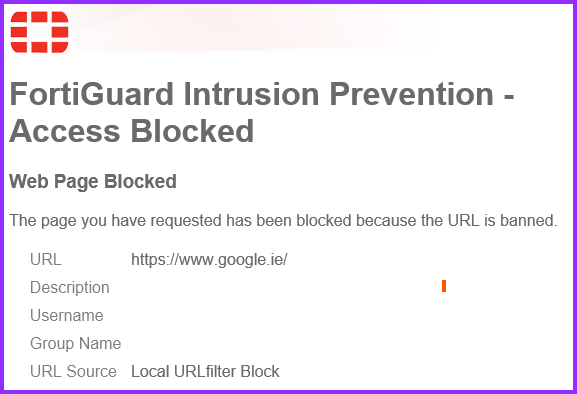
This type of warning is usually caused by local or network security settings rather than an actual problem with the Catalyst site. Once your IT team allows the site through your security software, you should be able to access Catalyst without any certificate warnings.
We can work directly with your IT team to resolve the issue. Submit a request or contact support@ebmsoftware.com and include any screenshots you’ve captured.
Comments
0 comments
Article is closed for comments.